Android available on Google Play iOS coming soon on the App Store

Offline AI

Offline AI Translator & Chat

Text, OCR, speech, and AI chat running locally on your phone.

Android is available on Google Play. The iOS app is being prepared for the App Store on iPhone and iPad. Core workflows stay offline-first after local model setup.

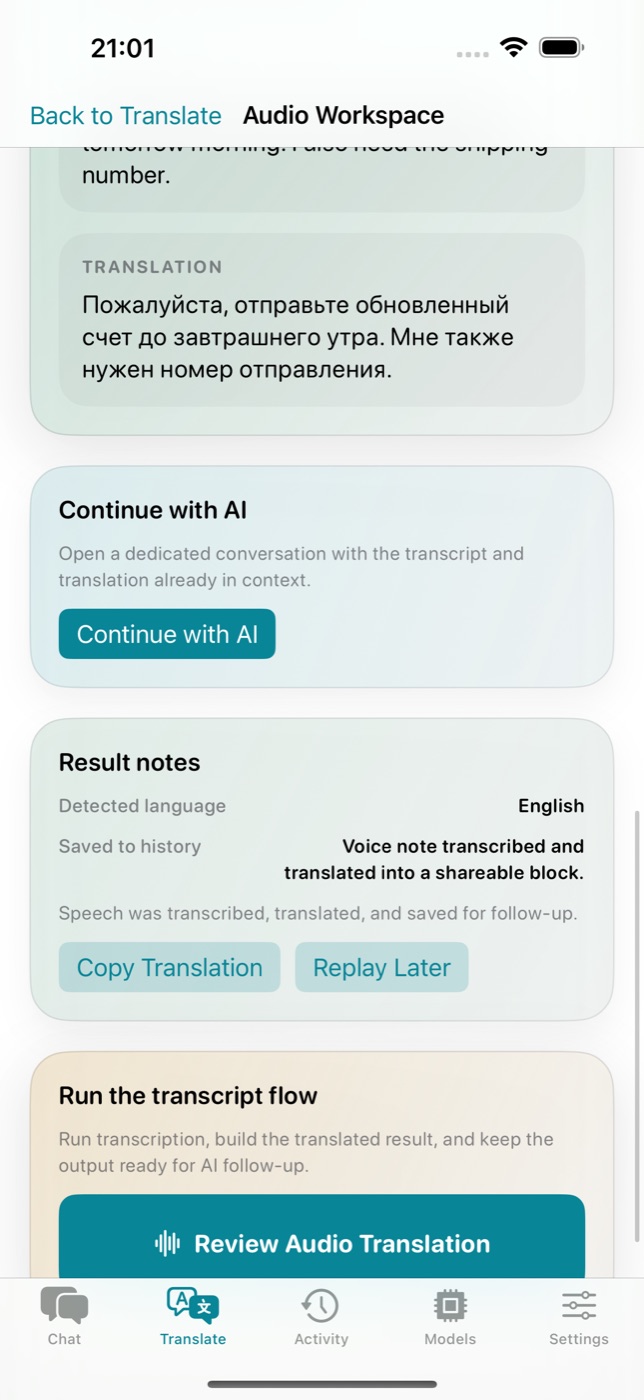
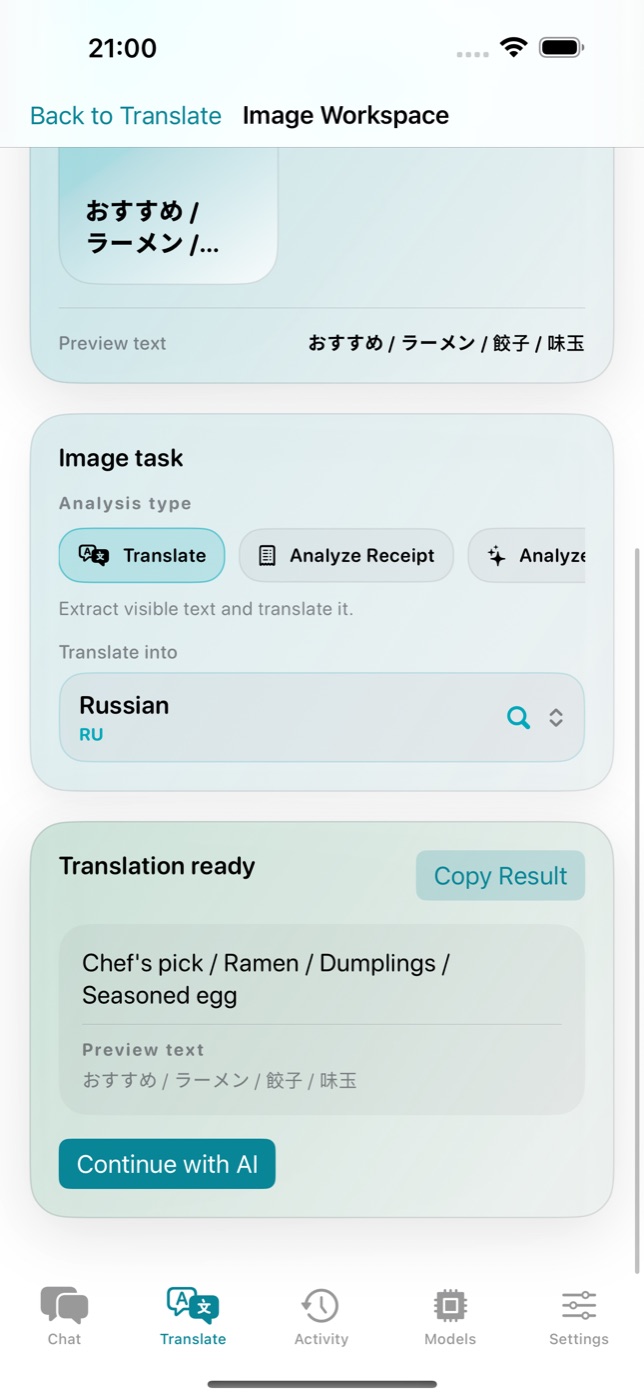
Text Image/OCR Audio Private AI chat
See the product workflows
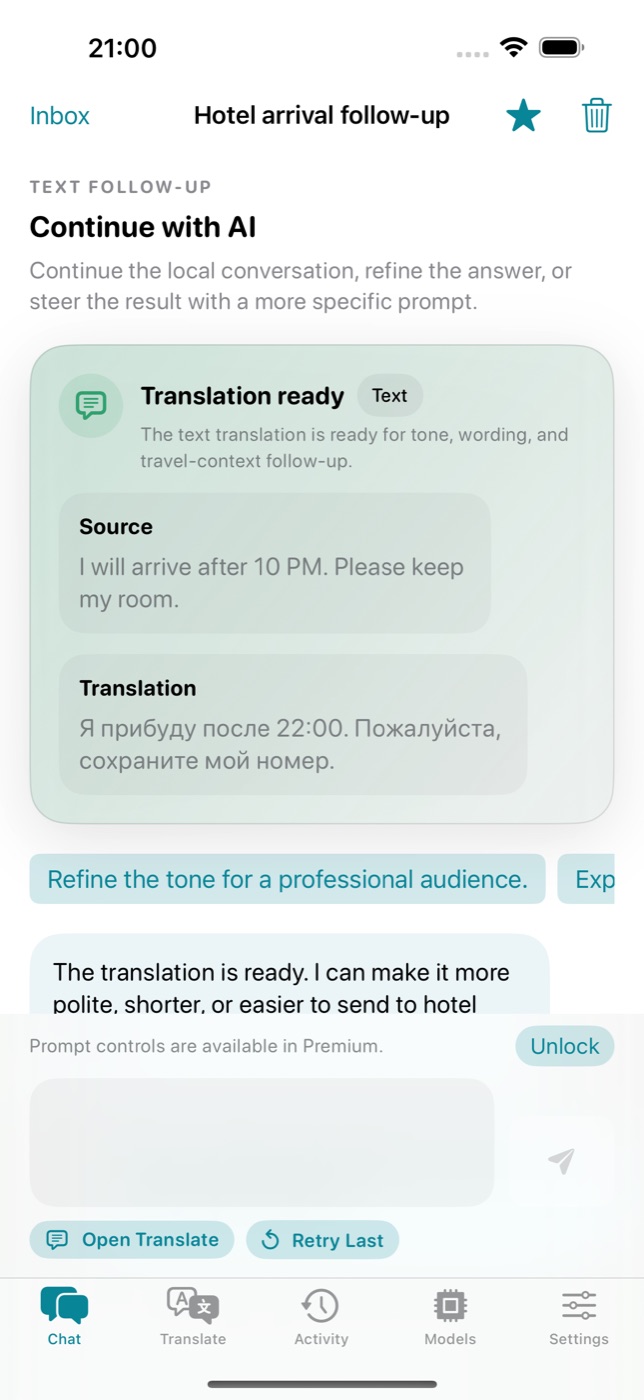
Private AI chat
iOS · Private AI chat
Text translation
Android · Text translation
Product tour

Four workflows in one app flow

Start with text, image, or audio, then continue the result in a private on-device AI chat.

Active workflow

Private AI chat

Continue translation results into an on-device conversation.
Private AI chat
功能

翻译、对话与分析——本地运行

AI translation, private chat, and image analysis run locally on Android and iOS.

📝

文本翻译

使用Gemma 4 AI即时翻译任何文本。支持50+语言,结果自然流畅。

📸

图像和OCR翻译

将相机对准标牌、菜单或文件。AI提取并翻译任何图像中的文字。

🎙️

音频和语音翻译

说话即获得即时翻译。非常适合海外对话和实时交流。

🔒

Local-First Privacy

Prompts, OCR text, transcripts, images, audio, and conversations are not sent to cloud AI.

GPU加速

利用设备GPU进行快速AI推理。几秒内获得翻译结果。

🎨

智能个性化

本地存储翻译历史。深色和浅色主题供您选择。

💬

AI对话与分析

超越翻译。提问、分析文档、与AI多轮对话——全部在设备上,无需云端。

隐私优先

您的数据留在设备上

Core content stays on your device. Diagnostics and anonymous product analytics are disclosed separately and do not include translations, OCR text, transcripts, or chats.

🤖

On-device AI

Models run on the device; prompts and results are not sent to cloud AI.

📡

Offline-first

After model setup, the core workflows do not need a constant internet connection.

🧰

Minimal diagnostics

Crash/error diagnostics support stability and must not include user content.

⚙️

Settings control

Anonymous product analytics can be turned off in the app settings.

Local-first

Core content stays local

🔒
Core content
prompts, OCR, audio, images, chats
Local storage
history, settings, model records
Limited network
model downloads, purchases, diagnostics
User control
analytics opt-out in Settings where available
应用预览

Android and iOS screenshots without marketing fog

Real screens show workflow, platform status, and local model setup. The hero asset loads first, while the rest stay lazy.

简单设置

3步开始翻译

Install the app, download a local model, and use translation without a constant cloud dependency.

01

Install the app

Android is available on Google Play. The iOS page is ready now, with the App Store link added after release.

02

Download a model

Choose Basic Model or Advanced Model. The setup installs local assets for offline-first workflows.

03

Translate and continue in chat

Use text, image, and audio flows, then continue successful results in AI chat.

AI模型

由Google Gemma 4驱动

Model asset sizes differ by platform and build. The app shows the exact download size before installation.

Basic Model

local model

A faster starting point for everyday translation on compatible devices.

模型大小
~2.6-3.2 GB
所需内存
~4 GB+
  • Text/Image/Audio flows
  • Local setup
  • Exact size shown in app
  • Good first install
Capable devices
Advanced Model

higher quality

A heavier option for better quality when device memory and storage allow it.

模型大小
~3.7-4.3 GB
所需内存
~6 GB+
  • More context
  • Better for complex text
  • Needs more memory
  • Managed in model library
适用人群

适合各种场景

Common workflows for travel, work, study, and accessibility without sending user content to cloud AI.

✈️

Travel

Translate signs, menus, and phrases after installing a local model.

💼

Work

Handle sensitive text locally; diagnostics and analytics should not include user content.

🎓

Study

Understand foreign-language text and continue the result in private AI chat.

Accessibility

Use text, OCR, and speech handoff for different input styles.

定价

Free flow, then contextual upgrade

Android uses Google Play Billing, and iOS uses StoreKit. Subscriptions and lifetime purchase are managed by the platform store.

1

Free flow

Start with model setup and useful local workflows.

2

Contextual upgrade

Premium appears where advanced capabilities are useful.

3

Platform purchases

Android is managed by Google Play, while iOS uses StoreKit/App Store.

The App Store link will be added after the iOS app is published.

语言

支持50+种语言

从主要世界语言到地区方言——全部在设备上运行。

English Русский 中文 日本語 한국어 Español Français Deutsch Italiano Português العربية हिन्दी Türkçe Українська Polski Nederlands Svenska Tiếng Việt ไทย Bahasa Indonesia עברית Suomi Norsk Dansk Čeština Magyar Română Ελληνικά Bahasa Melayu Filipino বাংলা தமிழ் తెలుగు मराठी ਪੰਜਾਬੀ فارسی اردو Afrikaans Català Euskara Galego Hrvatski Slovenčina Slovenščina Srpski Bosanski Shqip Монгол Azərbaycan Қазақ Беларуская Lietuvių Latviešu Eesti English Русский 中文 日本語 한국어 Español Français Deutsch Italiano Português العربية हिन्दी Türkçe Українська Polski Nederlands Svenska Tiếng Việt ไทย Bahasa Indonesia עברית Suomi Norsk Dansk Čeština Magyar Română Ελληνικά Bahasa Melayu Filipino বাংলা தமிழ் తెలుగు मराठी ਪੰਜਾਬੀ فارسی اردو Afrikaans Català Euskara Galego Hrvatski Slovenčina Slovenščina Srpski Bosanski Shqip Монгол Azərbaycan Қазақ Беларуская Lietuvių Latviešu Eesti
系统要求

所需配置

Local models need enough memory and storage on the device. Requirements differ by platform.

Android

Minimum
Android 12+, 4 GB RAM
Recommended
Android 13+, 6+ GB RAM
Storage
8-12+ GB free
Store
Google Play

iOS iOS

Minimum
iOS 18+
Devices
iPhone and iPad
Storage
Depends on selected model
Store
App Store after release
常见问题

常见问题解答

关于Offline AI Translator & Chat您需要了解的一切。
Does the app work without internet?
Yes. After the local model is installed, the core translation, OCR/STT handoff, and AI chat workflows are offline-first on the device.
Which platforms are supported?
The Android app supports Android 12+. The iOS app is being prepared for iPhone and iPad on iOS 18+.
When will the App Store link be available?
The App Store link will be added after the iOS app is published. Until then, the iOS page shows a coming-soon state.
What data leaves the device?
User content is not sent to cloud AI. Platform purchases, crash/error diagnostics, and anonymous product analytics may run without prompts, OCR text, transcripts, images, audio, or translated content.
Can analytics be turned off?
The iOS app includes a Settings opt-out for anonymous product analytics. Diagnostics are used for stability and should not include user content.