Android available on Google Play iOS coming soon on the App Store

Offline AI

Offline AI Translator & Chat

Text, OCR, speech, and AI chat running locally on your phone.

Android is available on Google Play. The iOS app is being prepared for the App Store on iPhone and iPad. Core workflows stay offline-first after local model setup.

Text Image/OCR Audio Private AI chat
See the product workflows
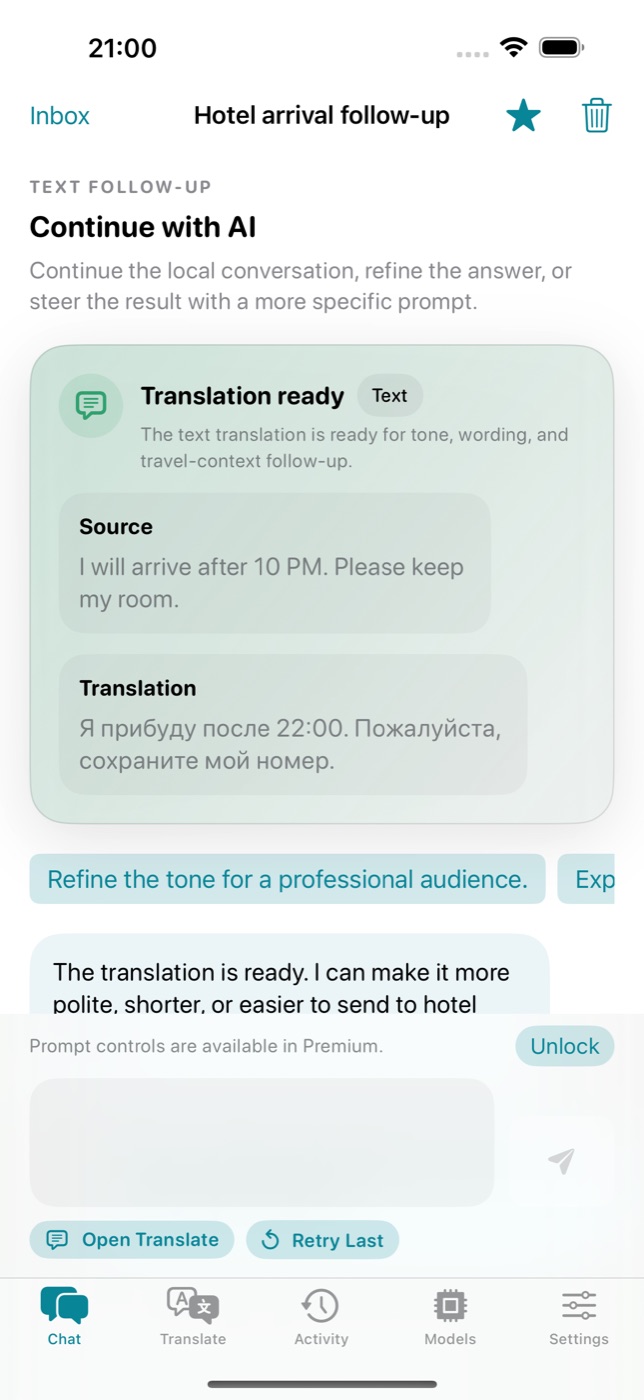
Private AI chat
iOS · Private AI chat
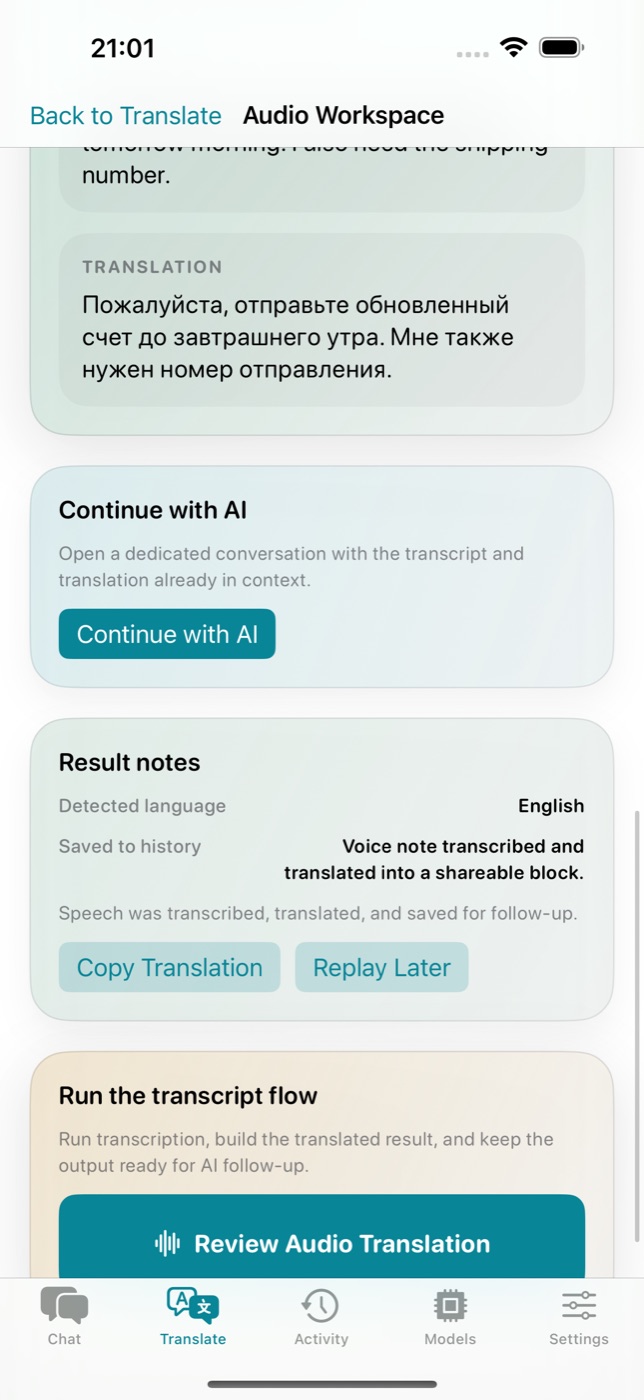
Text translation
Android · Text translation
Product tour

Four workflows in one app flow

Start with text, image, or audio, then continue the result in a private on-device AI chat.

Active workflow

Private AI chat

Continue translation results into an on-device conversation.
Private AI chat
Capabilities

Translate, Chat & Analyze — On-Device

AI translation, private chat, and image analysis run locally on Android and iOS.

📝

Text Translation

Translate any text instantly with Gemma 4 AI. Supports 50+ languages with natural, context-aware results.

📸

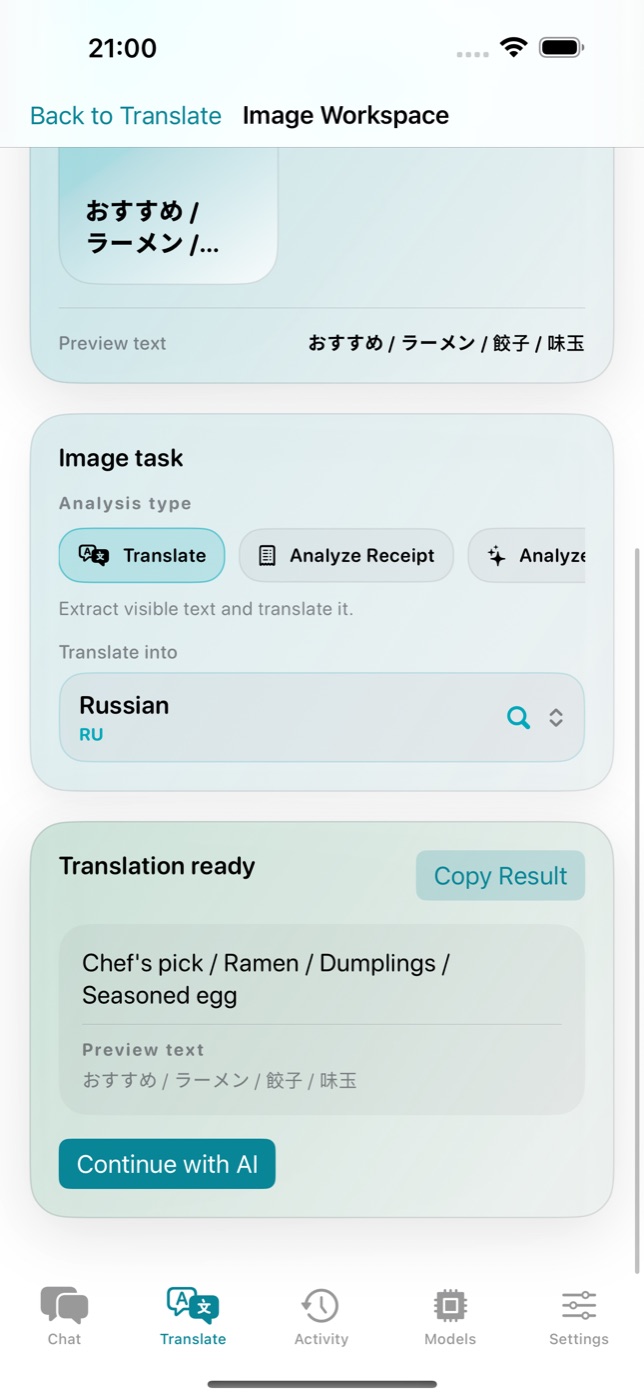
Image & OCR Translation

Point your camera at signs, menus, or documents. The AI extracts and translates text from any image.

🎙️

Audio & Speech Translation

Speak and get instant translations. Perfect for conversations and real-time communication abroad.

🔒

Local-First Privacy

Prompts, OCR text, transcripts, images, audio, and conversations are not sent to cloud AI.

GPU-Accelerated

Leverages your device's GPU for fast AI inference. Get translations in seconds, not minutes.

🎨

Smart Personalization

Remembers your translation history locally. Dark and light themes to suit your preference.

💬

AI Chat & Analysis

Go beyond translation. Ask questions, analyze documents, and have multi-turn AI conversations — all on-device, no cloud.

Privacy First

Your Data Stays on Your Device

Core content stays on your device. Diagnostics and anonymous product analytics are disclosed separately and do not include translations, OCR text, transcripts, or chats.

🤖

On-device AI

Models run on the device; prompts and results are not sent to cloud AI.

📡

Offline-first

After model setup, the core workflows do not need a constant internet connection.

🧰

Minimal diagnostics

Crash/error diagnostics support stability and must not include user content.

⚙️

Settings control

Anonymous product analytics can be turned off in the app settings.

Local-first

Core content stays local

🔒
Core content
prompts, OCR, audio, images, chats
Local storage
history, settings, model records
Limited network
model downloads, purchases, diagnostics
User control
analytics opt-out in Settings where available
App Preview

Android and iOS screenshots without marketing fog

Real screens show workflow, platform status, and local model setup. The hero asset loads first, while the rest stay lazy.

Simple Setup

Get Translating in 3 Steps

Install the app, download a local model, and use translation without a constant cloud dependency.

01

Install the app

Android is available on Google Play. The iOS page is ready now, with the App Store link added after release.

02

Download a model

Choose Basic Model or Advanced Model. The setup installs local assets for offline-first workflows.

03

Translate and continue in chat

Use text, image, and audio flows, then continue successful results in AI chat.

AI Models

Powered by Google Gemma 4

Model asset sizes differ by platform and build. The app shows the exact download size before installation.

Basic Model

local model

A faster starting point for everyday translation on compatible devices.

Model Size
~2.6-3.2 GB
RAM Required
~4 GB+
  • Text/Image/Audio flows
  • Local setup
  • Exact size shown in app
  • Good first install
Capable devices
Advanced Model

higher quality

A heavier option for better quality when device memory and storage allow it.

Model Size
~3.7-4.3 GB
RAM Required
~6 GB+
  • More context
  • Better for complex text
  • Needs more memory
  • Managed in model library
Who It's For

Perfect for Every Situation

Common workflows for travel, work, study, and accessibility without sending user content to cloud AI.

✈️

Travel

Translate signs, menus, and phrases after installing a local model.

💼

Work

Handle sensitive text locally; diagnostics and analytics should not include user content.

🎓

Study

Understand foreign-language text and continue the result in private AI chat.

Accessibility

Use text, OCR, and speech handoff for different input styles.

Pricing

Free flow, then contextual upgrade

Android uses Google Play Billing, and iOS uses StoreKit. Subscriptions and lifetime purchase are managed by the platform store.

1

Free flow

Start with model setup and useful local workflows.

2

Contextual upgrade

Premium appears where advanced capabilities are useful.

3

Platform purchases

Android is managed by Google Play, while iOS uses StoreKit/App Store.

The App Store link will be added after the iOS app is published.

Languages

50+ Languages Supported

From major world languages to regional dialects — all running on-device.

English Русский 中文 日本語 한국어 Español Français Deutsch Italiano Português العربية हिन्दी Türkçe Українська Polski Nederlands Svenska Tiếng Việt ไทย Bahasa Indonesia עברית Suomi Norsk Dansk Čeština Magyar Română Ελληνικά Bahasa Melayu Filipino বাংলা தமிழ் తెలుగు मराठी ਪੰਜਾਬੀ فارسی اردو Afrikaans Català Euskara Galego Hrvatski Slovenčina Slovenščina Srpski Bosanski Shqip Монгол Azərbaycan Қазақ Беларуская Lietuvių Latviešu Eesti English Русский 中文 日本語 한국어 Español Français Deutsch Italiano Português العربية हिन्दी Türkçe Українська Polski Nederlands Svenska Tiếng Việt ไทย Bahasa Indonesia עברית Suomi Norsk Dansk Čeština Magyar Română Ελληνικά Bahasa Melayu Filipino বাংলা தமிழ் తెలుగు मराठी ਪੰਜਾਬੀ فارسی اردو Afrikaans Català Euskara Galego Hrvatski Slovenčina Slovenščina Srpski Bosanski Shqip Монгол Azərbaycan Қазақ Беларуская Lietuvių Latviešu Eesti
System Requirements

What You Need

Local models need enough memory and storage on the device. Requirements differ by platform.

Android

Minimum
Android 12+, 4 GB RAM
Recommended
Android 13+, 6+ GB RAM
Storage
8-12+ GB free
Store
Google Play

iOS iOS

Minimum
iOS 18+
Devices
iPhone and iPad
Storage
Depends on selected model
Store
App Store after release
FAQ

Frequently Asked Questions

Everything you need to know about Offline AI Translator & Chat.
Does the app work without internet?
Yes. After the local model is installed, the core translation, OCR/STT handoff, and AI chat workflows are offline-first on the device.
Which platforms are supported?
The Android app supports Android 12+. The iOS app is being prepared for iPhone and iPad on iOS 18+.
When will the App Store link be available?
The App Store link will be added after the iOS app is published. Until then, the iOS page shows a coming-soon state.
What data leaves the device?
User content is not sent to cloud AI. Platform purchases, crash/error diagnostics, and anonymous product analytics may run without prompts, OCR text, transcripts, images, audio, or translated content.
Can analytics be turned off?
The iOS app includes a Settings opt-out for anonymous product analytics. Diagnostics are used for stability and should not include user content.